Text Message Price Updates
How marina operators sign up for and use My Fuel Dock SMS updates
My Fuel Dock offers registered marina operators an optional way to update their fuel prices by text message. Instead of logging into the portal, an operator can send a quick text such as "Regular is now $5.49" to our service number, and we update the price board on their website. Our system texts back to confirm the update, or to ask a clarifying question when something is unclear (for example, if the marina sells two grades of gas and the text does not say which one changed).
Who Can Use This Service
Text updates are available only to marina operators who have a My Fuel Dock account and have verified their mobile number. This is a business tool for managing a marina's own fuel prices. It is not a consumer service and is not offered to the general public. Submitting price updates by text is a premium feature; only a phone number verified on an active premium account (trial, charter, or paid) can submit price updates.
How to Opt In
You opt in by verifying your mobile number inside your account:
- Create a My Fuel Dock account at myfueldock.com and verify your email address.
- Sign in and open the My Account screen.
- Enter your mobile phone number and review the consent statement shown next to the field.
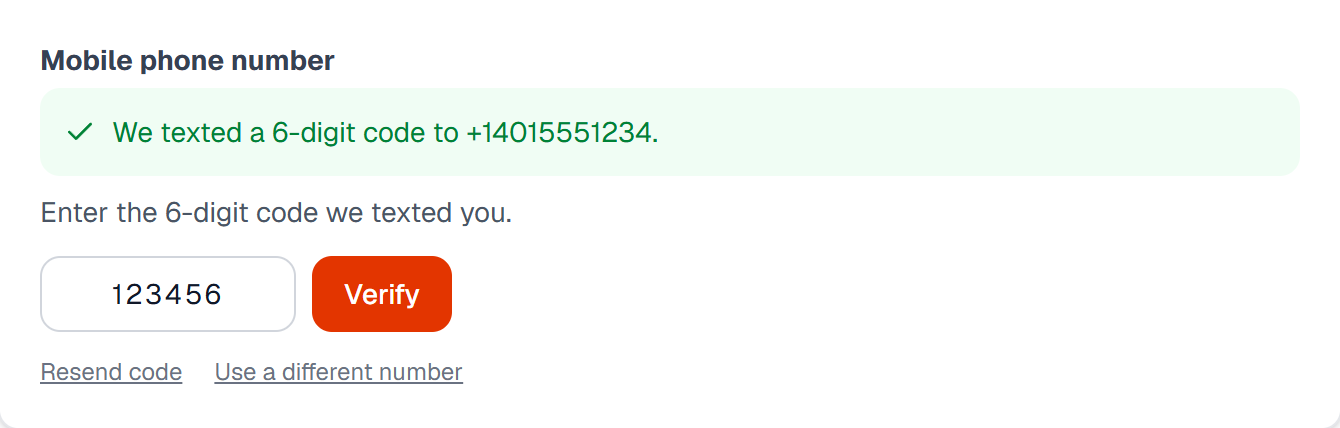
- Tap Send code. We text a 6-digit code to your number. Entering that code confirms you own the number and completes your opt-in.
Your service number, (401) 262-8427(401) 262-8427, is shown in your account and included in your welcome email. Once your number is verified, you submit price updates by texting that number.
What the Opt-In Screen Looks Like
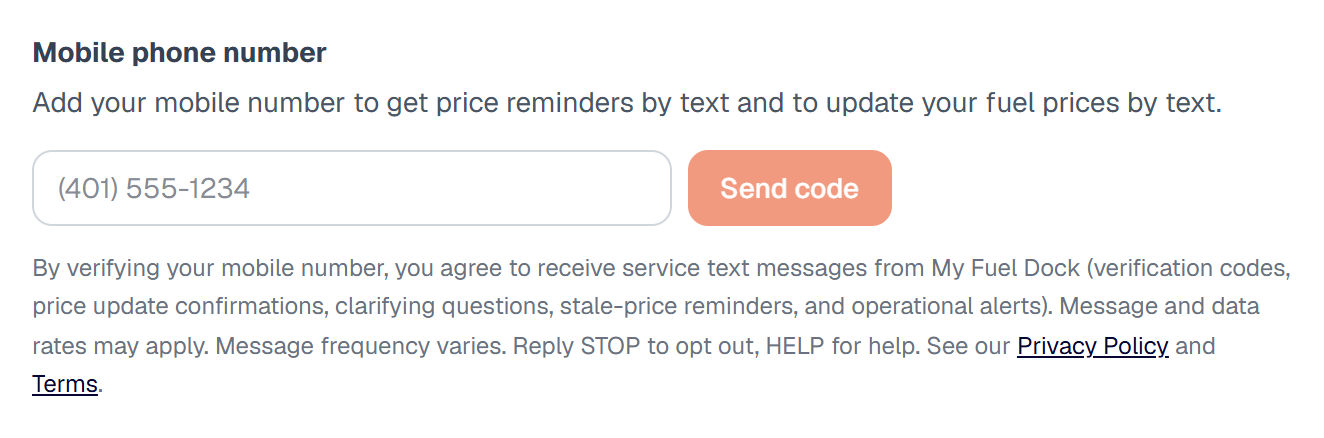
This is the full opt-in flow a signed-in operator completes on the My Account screen (My Account → Account details).
Step 1. The operator enters their mobile number, reviews the consent disclosure, and taps Send code:
Step 2. A 6-digit code is texted to the number; the operator enters it to confirm:
Step 3. Once the code is entered, the mobile number is verified and opt-in is complete:

Consent Statement
The following statement is shown next to the mobile number field at the point of opt-in:
By verifying your mobile number, you agree to receive service-related text messages from My Fuel Dock, including verification codes, price update confirmations, clarifying questions, stale-price reminders, and operational alerts. Message and data rates may apply. Message frequency varies. Reply STOP to opt out. Reply HELP for help.
What Messages You Will Receive
This service sends only messages related to operating your account:
- A one-time verification code when you add or change your mobile number
- Confirmations when a price update you texted in is applied
- Clarifying questions when a price update is ambiguous
- Reminders when your prices haven't changed in a while, so you can reply with the new prices
- Operational alerts (for example, when an update could not be processed)
We do not send marketing or promotional text messages.
Opt Out and Help
- Opt out: reply STOP to any message to stop all service text messages from My Fuel Dock.
- Help: reply HELP to any message to receive contact information, or email contact@myfueldock.com.
- Opt back in: reply START to resume messages after you have opted out.
You can also remove or change your verified mobile number at any time on the My Account screen. Opting out of text messages does not close your account or affect account-related email such as sign-in codes and billing notices.
Message Frequency and Rates
Message frequency varies based on how often you submit price updates and on operational events affecting your account. Message and data rates may apply, depending on your mobile carrier plan.
Privacy
We use your mobile number only to operate this service. We do not use SMS for marketing or promotional purposes, and we do not share mobile information or SMS opt-in data with third parties or affiliates for marketing or promotional purposes. For full details, see our Privacy Policy and Terms of Service.